Showing posts with label Microsoft Azure. Show all posts

Tuesday, January 14, 2020

Presenting at Microsoft Ignite The Tour: London

This week, I'm heading back over to the UK to present two sessions at Microsoft Ignite The Tour: London.


The two-day conference is sold out and will be hosted in the massive ExCel venue right in the middle of London City. I'll be accompanied by some of my Ergo colleagues and will be presenting the following two sessions on Friday:

Timeslot:
Friday 17th January 09:00am - 09:15am

Session Code:
THR30066

Location:
Theatre 1

Session Type:
Theatre (15 mins)

Title:
Azure Monitor and SCOM 2019, Real World Tips and Tricks!

Description:
Whether you’re using SCOM 2019 or Azure Monitor in stand-alone deployments or integrated together, you’ll be sure to find value with these tips and tricks from the trenches. With over a decade of real-world monitoring experience in the Microsoft space for this presenter to share, this is a session that you won’t want to miss.


Timeslot:
Friday 17th January 10:45am - 11:30am

Session Code:
BRK30128

Location:
Capital Suite 7 - 9

Session Type:
Breakout (45 mins)

Title:
Azure Monitor Deep Dive - Everything you need to know

Description:
In this presentation, we'll walk you through all of the many integrated services of Azure Monitor with live demo's and real-world tips to help you gain an understanding of this awesome monitoring service. We'll also show you how to leverage the skills you've built up over the years with traditional on-premises monitoring tools and apply them to the new wave of monitoring from Microsoft's public cloud.

Note: If you'd like to play a small role in one of the web application monitoring demo's I have for the Azure Monitor Deep Dive session, then please take a browse around my fictionial bakery website here and my new Tailwind Traders website here. I'll be capturing the web browsing telemetry that you generate and will present it in the session on Friday!


Hopefully I'll see some of you in London this week and please stop by my sessions if you'd like to learn more about what's going on in the Microsoft world of monitoring.

Wednesday, September 26, 2018

Speaking at Experts Live Europe 2018

This week, I'm over at the Microsoft Ignite conference learning as much as I can about the many new releases announced in the Azure and System Center world. All this information is an excellent way to prepare for my upcoming presentation at the awesome Experts Live Europe conference in Prague next month.


If you haven't heard of Experts Live Europe or just haven't had a chance to attend in previous years, this is a community-driven conference with a focus on Microsoft cloud, datacenter and workplace management. Hosted this year from October 24th -26th in the amazing city of Prague, Czech Republic - it really is one of the best Microsoft-focused conferences in Europe where attendees get to hang out and learn with top speakers from around the world.

Speakers

With over 40 speakers flying in from across the globe, you'll be treated to deeply technical and highly engaging presentations from Microsoft MVP's, Microsoft Regional Directors, Microsoft employees and well-know Community Champions. You can check out the full list of speakers here.

Pre-Conference Day

For the first time at an Experts Live Europe event, this year will host a Pre-Conference Day on October 24th with the following three parallel all-day deep-dive sessions:

  • Cloud & Cloud Security (delivered by Microsoft MVP Pete Zerger)
  • DevOps (delivered by Microsoft MVP Damian Flynn)
  • Enterprise Client Management (delivered by Microsoft MVP's Kent Agerlund and Marius Skovli)

Each of the pre-conference day instructors are highly skilled experts in their chosen fields and well-placed to set you on your learning journey over the full day.

Tracks

The main conference (running from October 25th - 26th) gives attendees 6 parallel tracks to choose from. With over 70 breakout sessions, plenty of community theater sessions and a packed exhibitor area, this conference has you covered for what you need to take your career to the next level.

My Session

On the Friday morning, I'll be presenting a session titled 'What’s New in the World of Microsoft Monitoring?' and in it, I'll help you get up to speed with all of the latest happenings in the Microsoft Monitoring world. There'll be loads of demo's to see on the newest Azure monitoring capabilities  and we'll also cover what's new in the latest release of SCOM.

Getting Registered

With over a month to go, there's still time to submit your business case to your boss so you can attend this really cool learning event. There's a number of registration options that you can choose from (depending on whether or not you wish to attend the pre-conference day) and there's also an opportunity to get access to the exclusive VIP Party in the Cloud event on the Wednesday.

To choose your ticket and get registered for Experts Live Europe, check out all the information you need here.

If you're attending, please take some time to chat with me and some of the other presenters during the conference. See you guys there!


Friday, July 6, 2018

Awarded Microsoft MVP 2018 for Cloud and Datacenter Management!

Last Sunday (1st July) I received a very welcome email into my inbox stating I'd been renewed as a Cloud and Datacenter Management MVP for 2018!


This email from Microsoft confirms that I'm now moving into my 7th year as an MVP and it's always a relief when it comes in as there's no guarantee that any of us will get renewed - no matter how much you think you've contributed to the community over the past year.

The MVP program enables me to network and interact with some of the best technical brains in the industry and I'm very lucky to work for an employer (Ergo) that supports me on this journey. Each year, they have given me the projects, tools and time that I need to enable me work with Cloud and Datacenter technologies in the Microsoft space - which in turn, helps me to contribute back to the community through this blog, my social media channels and to attend/speak at conferences where I can maximize my learning curve.

Due to some internal changes to the MVP award program, this year is the first time my renewal has come up in July (I'm originally an October awardee) and as such, it's 18 months since my last renewal date. Over those last 18 months, I've kept myself busy in the community by presenting at conferences such as Experts Live Europe, the Cloud and Datacenter Conference Germany, Experts Live NL and SCOM Day Sweden. I've also spent some time authoring with some awesome MVP friends on the 'Inside the Microsoft Operations Management Suite (v2)' book.

Thanks to my family, to everyone in Microsoft and the MVP community for their help and advice over the last year and also thanks to my friends and work colleagues at Ergo for helping me get this far in the program!

Friday, June 15, 2018

Azure Monitor - Alerting Gets an Upgrade

Earlier this week, Microsoft announced some upgrades to the alerts experience inside Azure Monitor and if you've ever worked with SCOM, then a few of these changes will have a pretty familiar look about them.


New Alert Enumeration Experience
There's a new Alert Enumeration feature which delivers a centralized view of all the alerts that have occurred across your various Azure deployments. You can query alerts across multiple subscriptions and sort them based on severity, signal types, resource type, and even resolution state. The enhanced alert enumeration feature is a serious upgrade on the previous Azure Monitor Alerts experience shown in the following image...


To upgrade to the new feature, click the purple banner at the top of the old Monitor - Alerts view and you will be presented with the following new enhanced user interface...


When you've upgraded, the first thing you will notice (assuming you've already got a few alerts present across your subscriptions), is that Azure Monitor has gathered all of your alerts into a central view and sorted them by Severity.

Now, if you've used SCOM Alert Rules in the past, you'll be familiar with Microsoft's method of defining severity levels using integers (where Critical = 2, Warning = 1 and Informational = 0). In Azure Monitor, Microsoft use a similar mapping process however, the lower numbered severity is the most important (which is the opposite to SCOM). You can read more about the exact Azure Monitor Alert Severity Mappings in my previous blog post here.

Clicking on any of the Severity links will then pivot you into the All Alerts page with a filter that's scoped to that particular severity.


Additional filters can then be applied to scope the view even further with options such as subscriptions, resource groups, time range and conditions to choose from.

Alert State Management

The next addition to Azure Monitor alerting is the new Alert State Management feature. These are essentially very similar to SCOM Alert Resolution States and in Azure Monitor, three alert resolution states are currently supported - New, Acknowledged and Closed.

You can manage the alert resolution state by drilling into an alert in the All Alerts view and clicking the Change Alert State button shown in the following image...


From there, you can use the drop-down menu to change the alert resolution state from New to either Acknowledged or Closed as shown here..


After that, you have the option to add a comment as to why you're changing the resolution state before then returning to the All Alerts view - where you should see the new Alert Resolution State assigned to your alert.

If you need to bulk-edit the resolution state of a number of alerts, then Microsoft have made this easy for you too. All you need to do is select each of the alerts that you need to modify, then hit the Change State button as shown in the following image...


Then modify your resolution state, add your comment and hit OK to return to the All Alerts view. Alert resolution states should now be easy to identify for all alerts that you've modified.

Something to keep in mind when working with these new Alert States is that they are completely separate from the Monitoring Condition - which supports two values - Fired and Resolved.  The Monitoring Condition indicates whether or not the condition that created a metric alert has subsequently been resolved.

To define the Monitoring Condition, the metric alert rules sample a particular metric at regular intervals and if the criteria in the alert rule is met, then a new alert is created with a condition of Fired. When the metric is sampled again and if the criteria is still the same, then nothing happens. However, if the criteria is not met, then the condition of the alert is changed to Resolved. The next time that the criteria is met, then a new alert is created with a condition of Fired.

Putting my SCOM hat back on again, the Monitoring Condition is a similar process to how SCOM Alert Monitors fire when a specific threshold is breached and then auto-close when that threshold is no longer breached.

One gotcha that might catch people out however, is that even though the system may set the Monitor Condition to Resolved, the alert state isn't changed until the user changes it manually and vice-versa. For example, if I modify an alert resolution state for a number of alerts and I set the resolution state to Closed, the Monitoring Condition will still show that the alert is still in a Fired state. The following image shows this exact scenario - where I've set the resolution state of a couple of my alerts to Closed, but as the metric that fired the alert in the first place is still present, the alerts are still displaying a Monitoring Condition of Fired.


Smart Groups

The final new alerting feature that I wanted to post about is Smart Groups. These contain alerts that were automatically grouped together based on either similarity, historical patterns or a combination of both. Smart Groups are automatically created using machine learning algorithms looking for similarity and co-occurrence patterns among alerts originating from a monitor service such as Log Analytics or across the rest of the Azure platform.

There's a couple of ways that you can view/access Smart Groups. The first method is to simply click the Smart Groups button from the All Alerts view in the new Alert Enumeration feature shown here...


The second method is to open the All Alerts view then click the blue banner as shown in this image...


Using Smart Groups, you can significantly reduce the number of alerts to analyze by focusing on only a handful of groups with some handy alert correlation in place.

As an example, if a performance counter such as CPU or RAM spikes on multiple virtual machines in your Azure subscription at the same time, this will generate a lot of alerts in Azure Monitor. When you click the Smart Groups feature, those alerts will get automatically grouped into a single Smart Group - offering up a much clearer picture of a common root cause.

In the following image, you can see a Smart Group that Azure Monitor has automatically created in my subscription where it has correlated 25 alerts together based on the reason that they are very similar to other alerts that have fired. From here, I can change the alert resolution state of individual alerts or I can use the Change Smart Group State button to change the resolution state of all alerts contained in the group.


Microsoft kicked the tires with alert correlation in SCOM when they released the Exchange 2010 management pack a few years ago and although it was quite noisy, the event correlation engine it came with was a similar concept to what we now have with Smart Groups. I think this is a pretty handy feature to have in your Azure monitoring toolbox and along with all the other features that have just launched, things are looking good for the next generation of Microsoft monitoring!


Azure Monitor Alert Severity Mappings


When I first started using SCOM, one of the things that I had to quickly get my head around was how alerts that were generated by rules were defined with a Severity that mapped to an integer value (e.g. Critical = 2, Warning = 1, and Informational = 0).

With alerts in Azure Monitor, Microsoft have taken a similar approach where they have defined five alert severity levels - each one mapping to it's own integer. These severity levels have been color-coded to help quickly identify alerts that should be treated as more important than others but for clarity, I've detailed the exact mappings as follows:

Azure Monitor Alert Severity Levels

Sev 0 = Critical
Sev 1 = Error
Sev 2 = Warning
Sev 3 = Informational
Sev 4 = Verbose


As you can see from the mappings above, in Azure, the lower the integer, the higher the severity - which is the opposite to alert rule severity mappings in SCOM. Hopefully this post will prove useful for any SCOM administrators who are dipping more into the Azure Monitor world over the coming year and might get slightly confused by the reverse numbering mapping between the two platforms.

If you'd like to read more about some newly announced feature enhancements in Azure Monitor, then check out my recent post here.

Wednesday, June 13, 2018

The OMS Portal is Moving to Azure

Over the last couple of years, I've worked a lot with the awesome Microsoft Operations Management Suite (aka OMS) and at one of the presentations I attended during Microsoft Ignite last year, it was announced that they would soon be retiring the OMS Portal and integrating all of it's functionality directly into the Azure Portal.

Earlier this week, Microsoft confirmed that the OMS Portal would indeed be retired and all it's functionality moved into the Azure Portal. The idea behind this move is to deliver a more centralized experience for monitoring and managing your on-premise and Azure-based workloads.

As it stands, nearly all of the existing OMS solutions have been available within the Azure Portal for a number of months and the only solutions still waiting to be ported over are as follows:
If you're using any of these solutions, then you'll still need to manage them within the original OMS Portal and Microsoft have committed to moving these solutions over to Azure by August 2018. When this happens, Microsoft will then communicate an official timeline for 'sunsetting' the original OMS Portal.

When this happens, the old OMS Portal that looks something like this (depending on which solutions you have enabled)...


Will then look like something similar to this in the Azure Portal...


As you can see from the two images above, they're not too dissimilar and in the Azure Portal, we get the added management benefit of being able to quickly pivot directly into Azure Resources using the navigation menu on the left or by simply drilling down into one of the dashboard widgets.

At the time of writing and along with the five OMS solutions mentioned earlier, there are still a few additional gaps that Microsoft need to address. These gaps are as follows:

  • To access Log Analytics resource in Azure, the user must be granted access through Azure role-based access.
  • Update schedules that were created with the OMS portal may not be reflected in the scheduled update deployments or update job history of the Update management dashboard in the Azure portal. This gap is expected to be addressed by the end of June 2018.
  • Custom logs preview feature can only be enabled through OMS Portal. By the end of June 2018, this will be automatically enabled for all work spaces.

You can read more about these gaps and the planned migration from the OMS portal to the Azure Portal in Microsoft's original post here.

They've also put together a useful FAQ post to help answer some common questions that you or your customers might have and you can access this post here.

All-in-all, I'm pretty happy with this move as I find that lately, I've been spending all of my time in the Azure Portal instead of the original OMS Portal. Having the additional management capabilities inside the Azure Portal definitely makes it a more seamless user experience and hopefully others will see the benefit of this too.

Monday, February 19, 2018

Speaking at the Global Azure Bootcamp 2018

This coming April 21st, I'll be presenting a session on Azure Monitoring at the Global Azure Bootcamp 2018 event in Dublin.


This annual event is now in its sixth year of running and is held on the same date in nearly 200 locations around the globe - bringing together some of the best speakers and contributors in the Azure community.

Organised as a free event by the Irish MVP community with support from the awesome people over at our local Microsoft team, we're running an agenda of three tracks side-by-side covering topics across Azure Infrastructure & Security (Track 1), Azure Compute/General (Track 2) and Azure Workshops/Lightning Talks (Track 3).

If you haven't attended one of these events before, here's the lowdown on what to expect (taken from our official event website):

"Welcome to Global Azure Bootcamp! All around the world, user groups and communities want to learn about Azure and Cloud Computing. On April 21, 2018, tech communities world-wide will come together once again in the sixth great Global Azure Bootcamp event!

In Dublin, we are organising the biggest community lead event yet, with two tracks and in-depth workshops during the day. Bootcamps are happening on the same day all over the world - come to Dublin and join in - please share your experience under the social hashtag #GlobalAzure!

It is important to point out, that while this event is *about* Azure, it is *not* a commercial event. Azure bootcamp Dublin is organised by the local MVP tech commmunity - we are here to share our knowledge, not sell anything."


Registration is filling up fast and if you miss out on a seat at the first attempt, we've put a waiting list system in place to hopefully help you grab a cancellation spot. You can check out the full agenda and list of speakers on the day along with your free registration at our new website here - http://www.azurebootcampdublin.com/index.html

Hope to see some of you guys there!

Thursday, January 25, 2018

Dude, where's my 'Outside-In' monitoring gone?

If you've been working with SCOM for as long as I have, you'll most likely have come across the very cool Global Service Monitor (GSM) feature that Microsoft first demonstrated way back in 2012 during the release of SCOM 2012 Service Pack 1 at the awesome Microsoft Management Summit in Vegas.


GSM simulates the end-user experience of accessing a web application as it can schedule automatic synthetic transactions from locations around the world - providing an 'Outside-In' availability, performance and reliability monitoring view of your externally facing web applications.

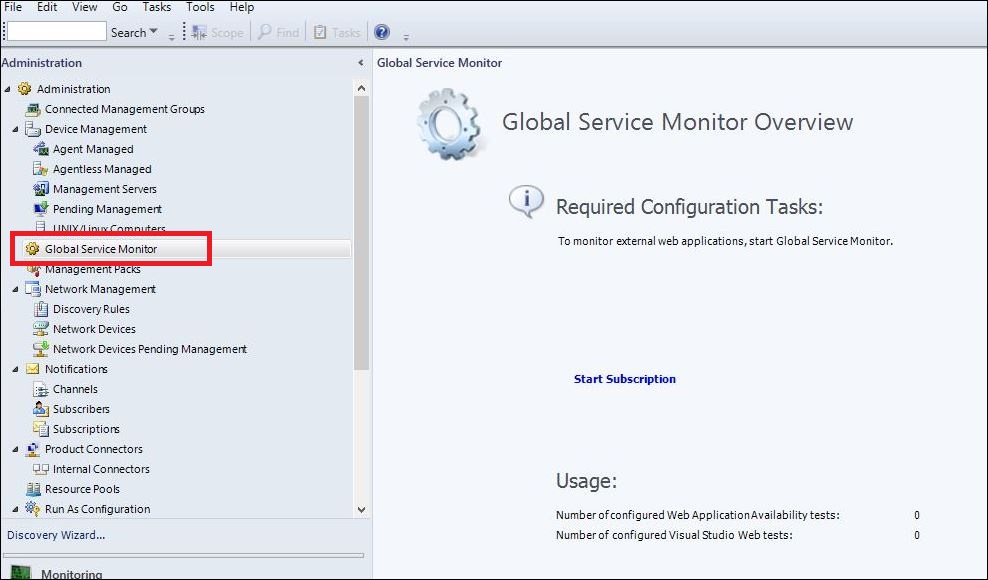
If you purchased a Software Assurance license for System Center 2012, then you were entitled to deploy the GSM management pack into your SCOM environments and use the Global Service Monitor connector shown in the following image to connect GSM in the cloud back into your on-premise SCOM deployment.


I've deployed GSM to a lot of customers over the years and it worked exactly as it was meant to along with adding some nice value when we were modeling IT services that needed an end-user perspective of the availability and performance of specific web applications.

Fast-forward to when SCOM 2016 was first released and although the GSM management pack guide only specified support for SCOM 2012, it still worked and delivered that 'Outside-In' monitoring experience.

Recently however, the GSM connector has stopped working for SCOM 2012 and also for SCOM 2016. If you had GSM running in your SCOM environment, you will probably have noticed an alert relating to a DNS resolution error - which on investigation looks like there's a DNS zone missing on the Microsoft side.

While no official statement has been released by Microsoft as to this connector being deprecated and this DNS issue may still be resolved, it's probably a good time to start thinking of an alternative option to GSM. This is where the Azure-based Application Insights platform comes in.

A few years back I wrote a few blog posts (here and here) that discussed an alternative to GSM when using Application Insights and last week after a discussion between a some MVP friends relating to the Global Service Monitor DNS resolution error in SCOM, Cameron Fuller (Cloud and Datacenter Management legend) put together an awesome walk-through blog post on using Application Insights as an alternative to GSM in SCOM.

Along with showing how to create a web availability test in Application Insights, Cameron also dives into some examples around custom dashboards and automatic application mapping. If you want to learn more, then I totally recommend checking out his post at the link below:

blogs.catapultsystems.com/cfuller/archive/2018/01/22/replacing-gsm-in-scom-with-application-insights/

Enjoy!


Tuesday, November 22, 2016

Experts Live NL 2016

Today I've just finished up presenting my last public conference session of 2016 at the awesome Experts Live conference in the Netherlands.


This is my second year to attend Experts Live NL and it already seems like the conference attendee and speaker count has grown significantly in that short space of time.

My presentation this year was titled 'Hacking OMS with your OpsMgr Skills' and is an extension of the session that I co-presented with my good friend Cameron Fuller at System Center Universe 2016 in August.

The original idea and title for this session was all Cameron's and with his blessing, I put my own spin on the content to ensure that Experts Live attendees were treated to a significantly different version of the one we delivered previously at SCU. Also, with the vast number of changes and feature additions that we've now become accustomed to with OMS, there was much to show on the day.

My session was the first to open after the keynote and it was refreshing to see the room filled with a large number of current OpsMgr users waiting to hear how to advance their skillsets with OMS.


(Photo credit Pedro van Vliet)

When my presentation was done, I took some time to hang out with old friends and to network with the attendees and various booth vendors around the event.


All in all, Experts Live NL was a good closure for me to a hectic few months of traveling and presenting. I'm looking forward to now refocusing my attention back onto my poor neglected blog and bringing some useful posts into the community over the coming months!


Wednesday, April 20, 2016

New OMS and Azure Hybrid Worker PowerShell Module Available

Today Tao Yang (the scripting and toolkit ninja from down-under) has just released another free PowerShell module - this time for the OMS and Azure Automation Hybrid Worker role.


Combining ideas from recent blog posts by Pete Zerger and Kevin Holman with some added knowledge based on real-world experience thrown in for good measure, Tao's HybridWorkerToolkit contains the following three PowerShell functions:

  • Get-HybridWorkerConfiguration - used to get the Hybrid Worker and Microsoft Monitoring Agent configuration.
  • Get-HybridWorkerJobRuntimeInfo - retrieves the following information about the Azure Automation runbook and the job run time.
  • New-HybridWorkerRunbookLogEntry - used to log event log entries.

Check out Tao's blog post for detailed information on each of these functions and if you're using Hybrid Workers with either OMS or Azure Automation, then I'd strongly recommend you download this module and give it a test drive.

It's available for download on both Github and the PowerShell Gallery.


Tuesday, January 5, 2016

Free OMS E-Book - Inside the Microsoft Operations Management Suite

Earlier today the preview version of a new free e-book on Microsoft's Operations Management Suite (OMS) was released. This book was authored by four of the best OMS ninja's around (Tao Yang, Stanislav Zhelyazkov, Pete Zerger and Anders Bengtsson) and after having a quick scan through its contents myself, I can already tell it's much more than your average 'low-page count' freebie.


With over 400 pages of technical goodness, you should find everything you need to know about OMS from the 12 chapters listed below in the book:

Chapter 1: Introduction and Onboarding
Chapter 2: Searching and Presenting OMS Data
Chapter 3: Alert Management
Chapter 4: Configuration Assessment and Change Tracking
Chapter 5: Working with Performance Data
Chapter 6: Process Automation and Desired State Configuration
Chapter 7: Backup and Disaster Recovery
Chapter 8: Security Configuration and Event Analysis
Chapter 9: Analyzing Network Data
Chapter 10: Accessing OMS Data Programmatically
Chapter 11: Custom Management Pack Authoring
Chapter 12: Cross-Platform Management and Automation


Whether you're a seasoned OMS aficionado or just a little curious about the next stage of Microsoft's cloud and datacenter management offerings, this book is for you.

Download it (FOR FREE!) here and make sure to give it a 5 star rating on the TechNet Gallery.

Thanks to the authors for all the hard work they've put into this - looking forward to learning loads from it!

Thursday, June 25, 2015

SCOM - Updated Community Windows Azure Pack MP V2

A few weeks back, I published a post about Oskar Landman's awesome new community MP for Windows Azure Pack and the big man's been at it again - this time giving us a fully redesigned Version 2.


If you liked the original MP, then this one gives you so much more - he even took the time to use some of my Visio stencils for Windows Azure Pack that I released last year (you can get the stencils from the following link):

http://kevingreeneitblog.blogspot.ie/2014/02/new-wap-azure-visio-stencils-available.html

This MP comes with all the classes, discoveries, monitors and rules that you should need to deliver comprehensive monitoring of your Windows Azure Pack environments.

Check out Oskar's full blog post on SystemCenterCentral.com at the following link:

http://www.systemcentercentral.com/windows-azure-pack-scom-management-pack-v2/

You can download the MP directly from the TechNet Gallery here.

Awesome work again Oskar - thanks for this super contribution :)


Friday, January 30, 2015

System Center Universe 2015 is just around the corner!

It's that time of the year again where, since 2012, Cameron Fuller and the team over at Catapult Systems have organised one of the best one-day System Center events on the planet in System Center Universe (SCU).


If you haven't heard of SCU before, or just didn't get the chance to attend previously, bring yourself up to speed with the history of the conference first here.

This years event kicks off on February 4th in Dallas, TX and will run across two separate (simultaneous) breakout tracks.

As usual, there's an awesome list of speakers on the day and here's just a sample of them:

  • Anders Bengtsson: Microsoft
  • Brad Anderson: Microsoft
  • Cameron Fuller: MVP
  • Dieter Wijckmans: MVP
  • Jason Sandys: MVP
  • Johan Arwidmark: MVP
  • John Savill: Microsoft
  • Kent Agerlund: MVP
  • Maarten Goet: MVP
  • Marc van Eijk: MVP
  • Pete Zerger: MVP
  • Travis Wright: MVP
  • Wally Mead

You can check out the full speaker list here.

The agenda for the day will include topics that cover ConfigMgr, OpsMgr, Service Manager and Microsoft Azure to name but a few. Here's the full agenda.

Now, if you're not familiar with how this plays out and you're thinking to yourself that you're going to miss all this awesome content because you won't be there in-person, or that you'll have to wait for weeks before the recordings are uploaded, fear not - SCU has the solution!

This event is streamed LIVE across the internet and all you have to do is register your interest and you're in!

So, mark your calendars, order the pizza, crack open a beer and sit back and enjoy the content for SCU 2015!

Tuesday, January 13, 2015

Free Online Training at TechDays Online 2015

There's only a few weeks left until we get to immerse ourselves in some free online training through the Microsoft-run 'Tech Days Online 2015' event. It will be live-streamed from the UK with a number of very well known speakers on the agenda.


What I love about these events are the fact that there's no traveling involved to attend, and it's all free! There's three tracks - split over three days - with some awesome presenters to walk you through the content.

Here's what's happening on each day...

Day 1 (Tuesday February 3)
Devices and Managing a Mobile-First World
09:30-09:40         Overview of the Day
09:40-10:15         Keynote: The repositioning of Microsoft & what this means for IT Pros &                             Devs - Mary-Jo Foley, Tech Journalist and Microsoft watcher
10:30-11:05         Devices, Devices Everywhere    
11:20-11:55         Windows 10 Client Innovations 
12:10-12:45         Enterprise Mobility - Justin Zarb
13:30-14:05         The Internet of Things - Paul Foster, MSFT UK & Robert Hogg
14:20-14:55         Microsoft Azure Remote App - Richard Astbury, (MVP)
15:10-15:45         Microsoft Azure RMS    
16:00-16:35         Microsoft Azure AD - Rick Hepworth, (MVP)
16:50-17:25         Microsoft Intune/SCCM - Steve Beaumont, (MVP)
17:25-17:30         Wrap up of day 1 - Part 1 - Ed Baker, MSFT UK


Day 1 Evening (Tuesday February 3)
An evening with Office 365

18:30 – 19:05      Migration of your mailboxes to Office 365
19:15 – 19:50      Building online collaboration inside Office 365
20:00 – 20:35      Keeping in touch with the online world
20:35 – 20:45      Final thoughts for the day


Day 2 (Wednesday February 4)
The Journey to the Cloud-first World

09:30-09:40         Overview of the Day - Andrew Fryer, Microsoft UK
09:40-10:15         What’s new Windows Server /Hyper –V - Gordon McKenna, (MVP)
10:30-11:05         How to find out what’s happening in your datacentre with Azure Insights                                - Sam Erskine, (MCT)
11:20-11:55         Host your own cloud with the Windows Azure Pack
                         
 - Damian Flynn, (MVP)
12:10-12:45         Taking scripting to the next level with Service Management / Azure                                     Automation - Jonathan Noble, (MVP)
13:30-14:05         A new home for your old applications - Susan Smith, Microsoft UK
14:20-14:55         20% + of Azure runs on Linux  - why is this important and how to do it                                 well? - Boris Devouge, (MVP)
15:10-15:45         DevOps in Microsoft Azure with Chef and Puppet for heterogeneous cloud                           environments - Tarun Arora  (MVP)
16:00-16:35         Make Azure your DMZ - Simon Skinner, (MVP)
16:50-17:25         Microsoft Corporate Keynote - Jeffrey Snover, Distinguished Engineer
17:25-17:30         Wrap up of Day 2 - Andrew Fryer, Microsoft UK


Day 3 (Thursday December 5)
Multi-device, Cross-platform Development

09:30-09:40         Overview of the Day - Martin Beeby, Microsoft UK
09:40-10:25         Creating x-platform apps with Visual Studio - Martin Hinshelwood, (MVP)
10:35-11:20         Vsual Studio ALM - Richard Fennell, (MVP)
11:30-12:15         Building next-generation apps with .NET and ASP.NET                                                       - Omar Al Zabir, (MVP)
13:00-13:45         Debugging web apps - Bianca Furtuna & Martin Kearn, Microsoft UK
13:55-14:40         ’Roslyn’ .NET compiler update 
14:50-15:35         Data Science Track - Andrew Fryer, Microsoft UK
15:45-16:30         Dev. community feedback - session based on community ideas
              - Martin Beeby, Microsoft UK
16:45-17:20         Microsoft Corporate Keynote - Scott Hanselman

Pretty impressive lineup eh?

So, if you're interested in joining the fun and learning more about your chosen track, then you can register for the event here.

Anyone that signs up and attends at least one day will also be entered into a draw to possibly win a new Surface Pro 3 so there's even more incentive to get registered.

See you all online there!


Thursday, December 4, 2014

Cloud Platform Integration Framework (CPIF) for the Modern Datacenter

Microsoft has just released a new download for their Cloud Platform Integration Framework (CPIF) for the Modern Datacenter. The download contains six documents (twelve if you count the fact that each one comes in both PDF and Word format) that delivers integration guidance for onboarding your applications into a Microsoft Cloud Solution.

Here's an overview of CPIF taken from their website:

"CPIF describes how organizations, Microsoft Partners and Solution Integrator's should design and deploy Cloud-targeted workloads utilizing the hybrid cloud platform and management capabilities of Azure, System Center and Windows Server."

Aligning with Microsoft's CloudOS story, the various components of the CPIF have been broken down into the functions shown in this graphic:


Quoting the website again:

"By integrating these functions directly into workloads, “platforms” can be developed which allow for further configuration by tenants to implement extended software services."

The download includes foundation documents for the following CPIF architecture patterns:

  • Azure Search Tier 
  • Multi-Site Data Tier 
  • Offsite Batch Processing Tier 
  • Web Tier 
  • Hybrid Networking
Sound interesting?

If so, then download the CPIF here.


Tuesday, August 19, 2014

Useful Recent CloudOS News and Blogs

Well, after a few weeks away from work on vacation, I've finally managed to filter through the majority of my unread emails and Twitter feeds. What I've come across from browsing through just a few short weeks of them is a number of very useful and cool updates and community offerings for System Center 2012 R2, Windows Azure Pack, Azure and Windows Server 2012 R2.

I've broken my favourites down into categories to make things easier to reference and if you haven't seen some of these posts yet and are working with CloudOS products, then I'd strongly advise you to check them out:

SCOM

Jalasoft – Xian SNMP Device Simulator V5


SCOM 2012 – Display & Download MPs Using PowerShell Widgets


VMM

Download the VMM Network Builder

Blog Series: Bare Metal Post-Deployment


So that's it in a nutshell for now - and although it's not a comprehensive list of everything that's been happening over the past month or so, there's still a lot of very impressive community content around CloudOS.

Enjoy!

Thursday, April 3, 2014

Walkthrough of the New Microsoft Azure Dashboard

Today at the Microsoft BUILD conference in San Francisco, Microsoft announced a major update to their Microsoft Azure portal. They've added a new interactive dashboard and after I've had a chance to play around with it using my own Azure subscription, my first impression - it seriously rocks!

Here's a screenshot of what they've done:


The first thing that gets you with this portal is the vibrant colours and the different tiles - which have obviously been designed with touch compatible devices in mind.

The main tile in the middle shows a real-time health state of each of the various Microsoft datacentre's around the globe...


Clicking on this tile will open up a scrollable list of all the various Azure services and their associated health states as shown here..


The tile at the bottom-left.....


 gives you access to the Azure Gallery as shown here...


The Billing tile below gives me a good reminder of how little credit I have left to use up for my demo environments!


The new navigation bar on the left-hand side is really slick too and the Notifications link will give me information on any problems or things that need my attention as part of my subscriptions...


Clicking the 'Browse' view, you can get access to the newly announced 'Resource Groups' feature as shown here.....


Which expands out to...


One of my favourite areas of this new dashboard is it's integration with the recently released Application Insights feature of Visual Studio Online, which can be accessed from the 'Websites' option inside the 'Browse' link from the navigation bar as shown here....


This expands out to...


Scrolling down through your website information gives you more Usage data like this...


 You also get your Operational data and information from these tiles...


Note: If you want to learn more about some of the data analytics and insights behind the website tiles, then check out my step-by-step walkthrough series of deploying Application Insights in Visual Studio Online here:

 Application Insights Deep Dive Part 1 - Getting Started

Conclusion

All things considered, I think Microsoft has done an awesome job of getting these types of visualisations into Azure and as a SCOM consultant, it's this type of value-add that draws customers to the product.

I read a tweet today during the BUILD conference where someone mentioned that this new Azure dashboard makes Amazon's AWS offering look like Notepad - I have to say, on the surface of it, that sounds like a pretty good analogy!

If you like what you see and have an Azure subscription, you can give the new dashboard a test drive yourself from the following link:

http://azure.microsoft.com/en-us/

Enjoy!