Last year I had the opportunity to head over to Munich and present at the awesome Cloud and Datacenter (CDC) conference organised by my good friend and well-known MVP Carsten Rachfal and I'm delighted to confirm I've been invited back again this year to present at CDC 2018.
I really enjoyed my time presenting over in Munich last year and the conference was packed with some of the best cloud and datacenter-focused speakers from around the world (the plentiful food and quality local beer helped too!). The attendees also came well prepared with some excellent interaction and questions across all of the sessions that I watched or was involved in.
This years event is being held in Congress Park Hanau (just east of Frankfurt) and with nearly thirty speakers already confirmed, it has the makings to be an even better conference than last years one - which will be hard to top!
Held over two days (15th & 16th May) and across six different tracks, there will be a mixture of sessions to choose from - some in English, some in German.
You can register to attend CDC Germany 2018 here and I'll post back with an update closer to the event.
Hope to see some of you guys over there 😊
Tuesday, February 6, 2018
Monday, February 5, 2018
SCOM 2016 and OMS '101' Series
A few years back, Antoni Hanus (Microsoft PFE) released a really useful beginners guide for SCOM titled 'Operations Manager 101'.
This PDF-style guide contained over 100 pages of information and walk-through's designed to get people up and running with SCOM quickly. It was that useful, that I always recommended it to my SCOM customers as a great free learning resource and the feedback on it was always positive.
The only downside to the guide was that it was authored specifically for SCOM 2007 and along with the retro-style Microsoft logo that you can see in the image above, all of the screenshots and content looked way too out-of-date for people dipping their toes with SCOM 2016. There was also no reference to how SCOM can now connect to OMS.
Thankfully, over the weekend I came across a blog post from Antoni where he has taken the opportunity to update this guide and push it out as a combined web-series for SCOM 2016 and OMS.
He's already got over 20 new blog posts linked to this series with more to come and if you're deploying SCOM (or just want to ramp up your SCOM 2016 administration skills), then I encourage you to check it out at the link below:
https://aka.ms/101
Happy reading!
This PDF-style guide contained over 100 pages of information and walk-through's designed to get people up and running with SCOM quickly. It was that useful, that I always recommended it to my SCOM customers as a great free learning resource and the feedback on it was always positive.
The only downside to the guide was that it was authored specifically for SCOM 2007 and along with the retro-style Microsoft logo that you can see in the image above, all of the screenshots and content looked way too out-of-date for people dipping their toes with SCOM 2016. There was also no reference to how SCOM can now connect to OMS.
Thankfully, over the weekend I came across a blog post from Antoni where he has taken the opportunity to update this guide and push it out as a combined web-series for SCOM 2016 and OMS.
He's already got over 20 new blog posts linked to this series with more to come and if you're deploying SCOM (or just want to ramp up your SCOM 2016 administration skills), then I encourage you to check it out at the link below:
https://aka.ms/101
Happy reading!
Thursday, January 25, 2018
Dude, where's my 'Outside-In' monitoring gone?
If you've been working with SCOM for as long as I have, you'll most likely have come across the very cool Global Service Monitor (GSM) feature that Microsoft first demonstrated way back in 2012 during the release of SCOM 2012 Service Pack 1 at the awesome Microsoft Management Summit in Vegas.
GSM simulates the end-user experience of accessing a web application as it can schedule automatic synthetic transactions from locations around the world - providing an 'Outside-In' availability, performance and reliability monitoring view of your externally facing web applications.
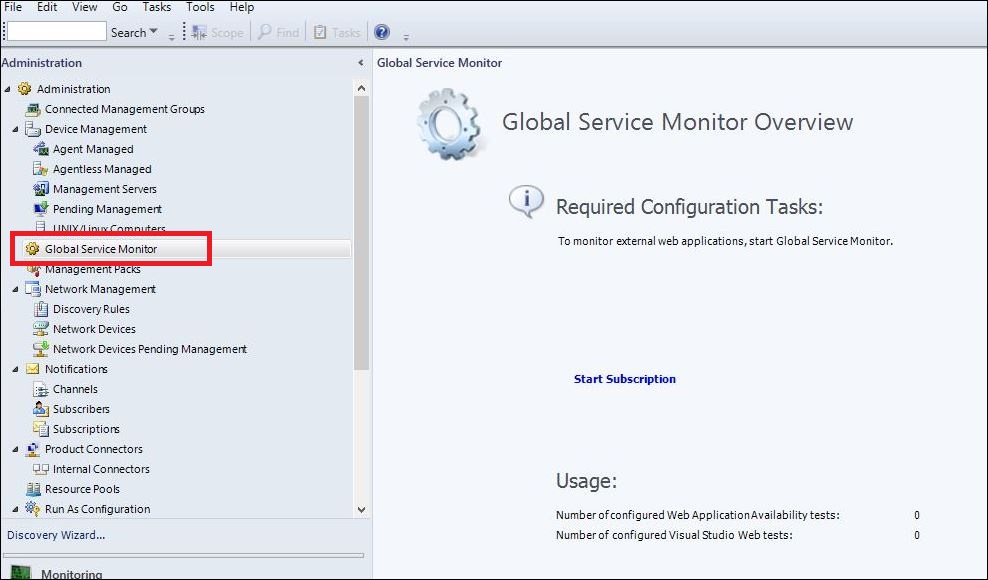
If you purchased a Software Assurance license for System Center 2012, then you were entitled to deploy the GSM management pack into your SCOM environments and use the Global Service Monitor connector shown in the following image to connect GSM in the cloud back into your on-premise SCOM deployment.
I've deployed GSM to a lot of customers over the years and it worked exactly as it was meant to along with adding some nice value when we were modeling IT services that needed an end-user perspective of the availability and performance of specific web applications.
Fast-forward to when SCOM 2016 was first released and although the GSM management pack guide only specified support for SCOM 2012, it still worked and delivered that 'Outside-In' monitoring experience.
Recently however, the GSM connector has stopped working for SCOM 2012 and also for SCOM 2016. If you had GSM running in your SCOM environment, you will probably have noticed an alert relating to a DNS resolution error - which on investigation looks like there's a DNS zone missing on the Microsoft side.
While no official statement has been released by Microsoft as to this connector being deprecated and this DNS issue may still be resolved, it's probably a good time to start thinking of an alternative option to GSM. This is where the Azure-based Application Insights platform comes in.
A few years back I wrote a few blog posts (here and here) that discussed an alternative to GSM when using Application Insights and last week after a discussion between a some MVP friends relating to the Global Service Monitor DNS resolution error in SCOM, Cameron Fuller (Cloud and Datacenter Management legend) put together an awesome walk-through blog post on using Application Insights as an alternative to GSM in SCOM.
Along with showing how to create a web availability test in Application Insights, Cameron also dives into some examples around custom dashboards and automatic application mapping. If you want to learn more, then I totally recommend checking out his post at the link below:
blogs.catapultsystems.com/cfuller/archive/2018/01/22/replacing-gsm-in-scom-with-application-insights/
Enjoy!
GSM simulates the end-user experience of accessing a web application as it can schedule automatic synthetic transactions from locations around the world - providing an 'Outside-In' availability, performance and reliability monitoring view of your externally facing web applications.
If you purchased a Software Assurance license for System Center 2012, then you were entitled to deploy the GSM management pack into your SCOM environments and use the Global Service Monitor connector shown in the following image to connect GSM in the cloud back into your on-premise SCOM deployment.
I've deployed GSM to a lot of customers over the years and it worked exactly as it was meant to along with adding some nice value when we were modeling IT services that needed an end-user perspective of the availability and performance of specific web applications.
Fast-forward to when SCOM 2016 was first released and although the GSM management pack guide only specified support for SCOM 2012, it still worked and delivered that 'Outside-In' monitoring experience.
Recently however, the GSM connector has stopped working for SCOM 2012 and also for SCOM 2016. If you had GSM running in your SCOM environment, you will probably have noticed an alert relating to a DNS resolution error - which on investigation looks like there's a DNS zone missing on the Microsoft side.
While no official statement has been released by Microsoft as to this connector being deprecated and this DNS issue may still be resolved, it's probably a good time to start thinking of an alternative option to GSM. This is where the Azure-based Application Insights platform comes in.
A few years back I wrote a few blog posts (here and here) that discussed an alternative to GSM when using Application Insights and last week after a discussion between a some MVP friends relating to the Global Service Monitor DNS resolution error in SCOM, Cameron Fuller (Cloud and Datacenter Management legend) put together an awesome walk-through blog post on using Application Insights as an alternative to GSM in SCOM.
Along with showing how to create a web availability test in Application Insights, Cameron also dives into some examples around custom dashboards and automatic application mapping. If you want to learn more, then I totally recommend checking out his post at the link below:
blogs.catapultsystems.com/cfuller/archive/2018/01/22/replacing-gsm-in-scom-with-application-insights/
Enjoy!
Labels:
Application Insights,
Azure,
Microsoft Azure,
MSOMS,
OMS,
SCOM,
SCOM 2012,
SCOM 2012 R2,
SCOM 2016
Monday, December 4, 2017
Update Rollup 14 for SCOM 2012 R2 Now Available
Last week Microsoft announced the release of Update Rollup 14 (UR14) for SCOM 2012 R2.
The Fixes
4055768 TLS 1.2 Protocol Support Deployment Guide for System Center 2012 R2
The Gotcha's
When you access Silverlight dashboards, a “Web Console Configuration Required” message is displayed.
My Advice
The Fixes
This latest update is as lightweight as they come and contains just a single key fix/enhcancement:
Update Rollup 14 for System Center components adds support for Transport Layer Security (TLS) protocol version 1.2. For more information about how to set up, configure, and run your environment to use TLS 1.2, see the following article in the Microsoft Knowledge Base:
4055768 TLS 1.2 Protocol Support Deployment Guide for System Center 2012 R2
The Web Console component of this update has the same known issue that we've seen with both UR13 for SCOM 2012 R2 and UR4 for SCOM 2016 whereby, after applying the update your web console's Silverlight configuration breaks! Here's a description of the issue:
To work around the Silverlight dashboard issue, you'll need to work through the following steps:
- Click Configure in the dialog box.
- When you are prompted to run or save the SilverlightClientConfiguration.exe file, click Save.
- Run the SilverlightClientConfiguration.exe file.
- Right-click the .exe file, click Properties, and then select the Digital Signatures tab.
- Select the certificate that has Digest Algorithm as SHA256, and then click Details.
- In the Digital Signature Details dialog box, click View Certificate.
- In the dialog box that appears, click Install Certificate.
- In the Certificate Import Wizard, change the store location to Local Machine, and then click Next.
- Select the Place all certificates in the following store option and then select Trusted Publishers.
- Click Next and then click Finish.
- Refresh your browser window.
As usual, my advice for deploying this update is to head over to Kevin Holman's blog and check out his handy step-by-step guide to get this up and running in your non-production environments first.
Tuesday, November 7, 2017
Update on the Roadmap for SCSM and Orchestrator
Back in June, Microsoft announced a change to the release cycle of System Center - where customers with an active Software Assurance license will see two new version releases a year. This change follows a similar track to how Microsoft now offer Configuration Manager - which has moved to a three-times-a-year release model - and it also brings the release cadence for System Center in line with Windows Server.
In the original announcement here of the new release cycle, you might have noticed that there was plenty of talk about how SCOM, SCVMM and DPM would be invested in but no mention of anything related to Service Manager (SCSM) or Orchestrator.
Over the last year or two, all of the messaging coming out of Microsoft has been that both SCSM and Orchestrator are essentially an abandoned ship - with no development or investment love coming their way as the move to cloud-based alternatives accelerates their demise.
Well, if you're currently working with SCSM and Orchestrator (or have a valid reason to not look at the cloud-based alternatives), then you'll be happy to know that Microsoft have recently clarified their position on their support and investment for both products in their 'SCSM Roadmap and Future' blog post here.
An encouraging quote directly from the blog post reads:
"System Center Service Manager and Orchestrator are still being developed and are part of this new release cycle along with the rest of System Center. Some semi-annual updates will only have fixes and some will have additional functionality. The features that get added to the entire suite each cycle will depend on customer demand and will be prioritized as such. The products which receive enhancements will likely vary each time. All products are therefore still fully supported.
Like many on-prem product groups, the SCSM team is currently working on incorporating more Azure and cloud service components into SCSM."
This should help allay fears that SCSM and Orchestrator are completely dead in the water but in the spirit of innovation, if you haven't yet looked at and tried out solutions such as Azure Automation, Azure Logic Apps and the ITSM integration with Azure Log Analytics, then you're missing a trick and need to check them out sooner rather than later!
Wednesday, October 25, 2017
SCOM 2016 Update Rollup 4 (UR4) Now Available
Yesterday Microsoft announced the release of Update Rollup 4 (UR4) for SCOM 2016.
The Fixes
This latest update contains bug fixes for the following 12 known issues:
The Fixes
This latest update contains bug fixes for the following 12 known issues:
- This update resolves an issue that causes a crash of IIS application pools that are running under CLR 2.0 when the APM feature is installed on the server as part of SCOM Agent. The code now uses appropriate memory instructions, based on the CLR version.
- When a log file is being monitored by SCOM, Monagent locks the file and won't allow it to be renamed.
- Adds support for TLS 1.2.
- Addresses an issue in which the APM AppDiagnostics console fails to create a Problem Management rule due to a FormatException. The appropriate string is now used for formatting, and the Problem Management wizard is able to run without issues.
- Failure of GetOpsMgrDBWatcherDiscovery.ps1 script causes the Monitoring Host to crash.
- WMI Health monitor doesn't work if WINRM is configured to use https only.
- WMI Health monitor doesn't work if SPN http://servername is set to a user account.
- Product knowledge of "Windows Cluster Service Discovery" includes an incorrect reference to "Windows NT."
- SCOMpercentageCPUTimeCounter.ps1 script generates WMI errors that are caused by Service Principle Name (SPN) configuration issues.
- After a network outage, the management server does not reconnect to the gateway server if the gateway server was installed with the /ManagementServerInitiatesConnection=True option.
- A configuration change to the network device triggers a rediscover of the device, and this process changes the SNMP agent address.
- The UseMIAPI registry subkey prevents collection of custom performance rules data for all Linux servers.
I've highlighted the two issues that I've been waiting to be resolved for a while - with the agent APM feature crashing IIS application pools issue also being the top ask from customers and the community since the initial release of SCOM 2016 late last year. This issue was supposed to be fixed in UR3 and although I've seen a decrease in the number of people reporting the issue in UR3 environments, it still wasn't completely resolved so hopefully they have it nailed in UR4.
The WMI Health Monitor issue is widely anticipated too and this should supersede the recently released 'Inbox MP Hotfix' Microsoft released for scenarios where WINRM was configured to use https only.
The Gotcha's
For the first time in a long while with these Update Rollups, Microsoft have released a list of known issues that you need to consider when deploying UR4.
Here's what they say to watch out for:
- During Audit Collection Services (ACS) update or removal, the Audit Collection Services Collector Setup wizard is incorrectly titled "System Center Operations Manager 2012 Audit Collection Server."
- When you access Silverlight dashboards, a “Web Console Configuration Required” message is displayed.
To work around the Silverlight dashboard issue, they've listed the following steps:
- Click Configure in the dialog box.
- When you are prompted to run or save the SilverlightClientConfiguration.exe file, click Save.
- Run the SilverlightClientConfiguration.exe file.
- Right-click the .exe file, click Properties, and then select the Digital Signatures tab.
- Select the certificate that has Digest Algorithm as SHA256, and then click Details.
- In the Digital Signature Details dialog box, click View Certificate.
- In the dialog box that appears, click Install Certificate.
- In the Certificate Import Wizard, change the store location to Local Machine, and then click Next.
- Select the Place all certificates in the following store option and then select Trusted Publishers.
- Click Next and then click Finish.
- Refresh your browser window.
My Advice
All in all, Update Rollup 4 seems like it will solve some important outstanding issues but the journey to deploying it and potentially having to manually import certificates seems like a pain. Outside the UR4 deployment I've already completed in my lab and on our internal corporate SCOM 2016 environments, I don't have enough hands-on experience with this UR to confirm if it solves all the problems it is supposed to.
My advice is that unless you're being screwed with the APM agent crash issue, then just hang tight on deploying this into production until more people across the SCOM community have pushed it out and until Kevin Holman gets a chance to put together another one of his awesome step-by-step guides to getting this installed.
Wednesday, September 27, 2017
SCOM Day Sweden 2017
Next week I 'll be on the road again and heading over to Gothenburg in Sweden to present at the awesome SCOM Day event.
Organised by the team at Approved Consulting, I presented at this event last year and really enjoyed the networking and talking to attendees about all things SCOM. This year, I'll be talking about what's new with SCOM (including some of my favourite community management packs) and I'll also be discussing some new features and changes that are coming to SCOM 2016 over the next few months.
I'll be looking forward to a presentation on the day from Microsoft's Kevin Holman (aka SCOM Ninja/Guru/Legend). Kevin is one of the most prolific SCOM bloggers around and there's always something new to learn from his blog posts and presentations.
If you're based in Scandinavia and want to attend the event (it's kicking off on Wednesday 4th October), then you can register using the link below:
http://www.approved.se/scom-dagen-2017-registrering
Hope to see some of you there!
Organised by the team at Approved Consulting, I presented at this event last year and really enjoyed the networking and talking to attendees about all things SCOM. This year, I'll be talking about what's new with SCOM (including some of my favourite community management packs) and I'll also be discussing some new features and changes that are coming to SCOM 2016 over the next few months.
I'll be looking forward to a presentation on the day from Microsoft's Kevin Holman (aka SCOM Ninja/Guru/Legend). Kevin is one of the most prolific SCOM bloggers around and there's always something new to learn from his blog posts and presentations.
If you're based in Scandinavia and want to attend the event (it's kicking off on Wednesday 4th October), then you can register using the link below:
http://www.approved.se/scom-dagen-2017-registrering
Hope to see some of you there!
Labels:
SCOM,
SCOM 2012 R2,
SCOM 2016,
System Center,
System Center 2016
Tuesday, August 29, 2017
Available Now: Inside the Microsoft Operations Management Suite (V2)
These past few months have been pretty hectic for me and as a result, this blog had to take a back seat for a while. Along with the day job, presenting at conferences and some family vacation time, I've been busy working with the team on an updated release of the awesome 'Inside the Microsoft Operations Management Suite' book.
The original release of this book was an essential 'must-have' for anybody working with Microsoft's Operations Management Suite (OMS) and it was a constant reference for me over the last year and a half while I tried to get my head around this new technology. As is always the case with cloud technologies however, things change at a drastic pace and an updated release of the original book was duly needed.
Meet the Team
With so many new features added to OMS, this update was never going to be a quick and easy task. Thankfully, the full original authoring team of Stan, Tao, Pete and Anders signed up again for the new release (bio's below):
Along with the original authors, a new team of technical editors (myself included) were brought on-board to help get this over the line:
What's it about?
This updated release provides readers with an end-to-end deep dive into the full range of Microsoft Operations Management Suite (OMS) features and functionality, complete with downloadable sample scripts.
Here's a rundown of the chapters to give you a good idea of the type of content you'll learn about:
Chapter 1: Introduction and Onboarding
Chapter 2: Searching and Presenting OMS Data
Chapter 3: Process Automation
Chapter 4: Configuration Management
Chapter 5: Change & Update Management
Chapter 6: Extending OMS Using Log Search
Chapter 7: Alert Management
Chapter 8: Log Management & Performance Data
Chapter 9: Azure & Office 365 Solutions
Chapter 10: Service Map & Wire Data
Chapter 11: Network Performance Monitor
Chapter 12: Other OMS Solutions
Chapter 13: Assessment Solutions
Chapter 14: Security & Compliance
Chapter 15: Protection & Recovery
Chapter 16: ITSM Integration
Chapter 17: Custom OMS Solutions
How much will it cost?
Keeping with the community spirit behind the first book, this release will be COMPLETELY FREE for download in E-Book format with the Kindle and Paperback versions coming to Amazon a couple months later. Keep in mind that the Kindle and Paperback versions will carry a nominal price to help cover production costs.
Download Info
You can download the e-book version right now from the link below and the Kindle and Paperback versions will be available on Amazon over the coming months:
http://tinyurl.com/insideomsbook
Hopefully you enjoy reading this book and working through all the demos as much as we did and if you've any comments/requests, please ping them to the email address here.
The original release of this book was an essential 'must-have' for anybody working with Microsoft's Operations Management Suite (OMS) and it was a constant reference for me over the last year and a half while I tried to get my head around this new technology. As is always the case with cloud technologies however, things change at a drastic pace and an updated release of the original book was duly needed.
Meet the Team
With so many new features added to OMS, this update was never going to be a quick and easy task. Thankfully, the full original authoring team of Stan, Tao, Pete and Anders signed up again for the new release (bio's below):
Along with the original authors, a new team of technical editors (myself included) were brought on-board to help get this over the line:
What's it about?
This updated release provides readers with an end-to-end deep dive into the full range of Microsoft Operations Management Suite (OMS) features and functionality, complete with downloadable sample scripts.
Here's a rundown of the chapters to give you a good idea of the type of content you'll learn about:
Chapter 1: Introduction and Onboarding
Chapter 2: Searching and Presenting OMS Data
Chapter 3: Process Automation
Chapter 4: Configuration Management
Chapter 5: Change & Update Management
Chapter 6: Extending OMS Using Log Search
Chapter 7: Alert Management
Chapter 8: Log Management & Performance Data
Chapter 9: Azure & Office 365 Solutions
Chapter 10: Service Map & Wire Data
Chapter 11: Network Performance Monitor
Chapter 12: Other OMS Solutions
Chapter 13: Assessment Solutions
Chapter 14: Security & Compliance
Chapter 15: Protection & Recovery
Chapter 16: ITSM Integration
Chapter 17: Custom OMS Solutions
How much will it cost?
Keeping with the community spirit behind the first book, this release will be COMPLETELY FREE for download in E-Book format with the Kindle and Paperback versions coming to Amazon a couple months later. Keep in mind that the Kindle and Paperback versions will carry a nominal price to help cover production costs.
You can download the e-book version right now from the link below and the Kindle and Paperback versions will be available on Amazon over the coming months:
http://tinyurl.com/insideomsbook
Hopefully you enjoy reading this book and working through all the demos as much as we did and if you've any comments/requests, please ping them to the email address here.
Monday, August 21, 2017
Experts Live Europe 2017
After a few weeks off work on vacation, it's back to full swing this week as I prepare to travel over to Berlin tomorrow for the awesome Experts Live Europe conference.
Formerly known as System Center Universe Europe, this is one of my favourite conferences to present, network and learn at. If it's anything like last years event, then the week ahead is going to be a blast.
I'll be presenting a session on Wednesday afternoon titled 'Monitoring...The Next Generation' where I'll be talking about some of the best new monitoring features available in the Microsoft space.
Later on Wednesday, I'll be back on stage with my buddy Stefan Roth for an 'Experts Discussion Panel' titled 'Monitoring, Insights and Analytics'. For this panel, we're encouraging attendees to bring their questions and engage in conversations - which will hopefully give people some real technical value to bring back to their workplace.
With close to 100 different sessions to choose from spanning topics such as Microsoft Azure, OMS, EMS, Azure Stack, System Center and Windows Server, there's something for everyone. Check out the session schedule here.
Looking forward to seeing everyone over there and make sure to drop in to one of my sessions and say hello!
Formerly known as System Center Universe Europe, this is one of my favourite conferences to present, network and learn at. If it's anything like last years event, then the week ahead is going to be a blast.
I'll be presenting a session on Wednesday afternoon titled 'Monitoring...The Next Generation' where I'll be talking about some of the best new monitoring features available in the Microsoft space.
Later on Wednesday, I'll be back on stage with my buddy Stefan Roth for an 'Experts Discussion Panel' titled 'Monitoring, Insights and Analytics'. For this panel, we're encouraging attendees to bring their questions and engage in conversations - which will hopefully give people some real technical value to bring back to their workplace.
With close to 100 different sessions to choose from spanning topics such as Microsoft Azure, OMS, EMS, Azure Stack, System Center and Windows Server, there's something for everyone. Check out the session schedule here.
Looking forward to seeing everyone over there and make sure to drop in to one of my sessions and say hello!
Labels:
Azure,
Experts Live,
MSOMS,
OMS,
SCOM,
System Center,
System Center Universe
Wednesday, May 24, 2017
SCOM 2016 Update Rollup 3 (UR3) Now Available
Yesterday, Microsoft released a new (and widely anticipated) Update Rollup (UR3) for SCOM 2016.
This update contains fifteen documented fixes with one in particular (APM crashing IIS agent) being the most important and a top priority for me and my customers due to the agent IIS crash issue I blogged about a while back.
***Update 6th June 2017: Microsoft has posted more information about this issue remaining after deploying UR3 and have mentioned a hotfix is still in the works. Check out their latest post on this issue here.***
Here's some of the highlights of fixes that are covered in this update:
This update contains fifteen documented fixes with one in particular (APM crashing IIS agent) being the most important and a top priority for me and my customers due to the agent IIS crash issue I blogged about a while back.
***Update 6th June 2017: Microsoft has posted more information about this issue remaining after deploying UR3 and have mentioned a hotfix is still in the works. Check out their latest post on this issue here.***
Here's some of the highlights of fixes that are covered in this update:
- The Application Performance Monitoring (APM) feature in System Center 2016 Operations Manager Agent causes a crash for the IIS Application Pool that's running under the .NET Framework 2.0 runtime. Microsoft Monitoring Agent should be updated on all servers that use .NET 2.0 application pools for APM binaries update to take effect. A restart of the server might be required if APM libraries were being used at the time of the update.
- When overriding multiple properties on rules that are created by the Azure Management Pack, duplicate override names are created. This causes overrides to be lost.
- When the heartbeat failure monitor is triggered, a "Computer Not Reachable" message is displayed even when the computer is not down.
- The Get-SCOMOverrideResult PowerShell cmdlet doesn't return the correct list of effective overrides.
- When creating a management pack (MP) on a client that contains a Service Level (SLA) dashboard and Service Level Objects (SLO), the localized names of objects aren't displayed properly if the client's CurrentCulture settings don't match the CurrentUICulture settings. In cases where the localized settings are English English, ENG, or Australian English, ENA, there's an issue when the objects are renamed.
- The Event ID: 26373 error, which may cause high memory consumption and affect server performance, has been changed from a “Critical” message to an “Informational” message.
- The UseMIAPI registry subkey prevents collection of processor performance data for RedHat Linux system. Also, custom performance collection rules are also impacted by the UseMIAPI setting.
- Organizational Unit (OU) properties for Active Directory systems are not being discovered or populated.
- The Microsoft.SystemCenter.Agent.RestartHealthService.HealthServicePerfCounterThreshold recovery task fails to restart the agent.
- An execution policy has been added as unrestricted to PowerShell scripts in Inbox management packs.
- SQL Agent jobs for maintenance schedule use the default database. If the database name is not the default, the job fails.
You can see the full list of fixes from the official UR3 knowledge base article here.
To get access to this update, you can choose to either manually download it from the Microsoft Update Catalog here or you can use Windows Update to pull down the update automatically to your SCOM 2016 environment.
**Note: I've yet to test this update rollup on the existing SCOM 2016 agents that I've previously applied the NOAPM=1 workaround to (mentioned in my post here) and I suspect that a push install of this UR from the console to those agents will fail as the APM binaries are no longer installed. I'll create a new post on updating those agents when I've tested the process fully.**
Whatever method you choose to deploy this update, make sure to read through the full installation instructions as there are some manual tasks to carry out once the update has been applied to each SCOM role and if you're not confident, I'd always recommend waiting for Microsoft's Kevin Holman to add his walk-through post for this UR to his blog here.
Finally, this update is one part of a larger UR3 release for covering other products in the System Center 2016 suite. If you've deployed additional components of the suite alongside SCOM, then you might be interested to check out the updates now available for DPM 2016, SCSM 2016 and SCVMM 2016.
Full details of all the fixes in the main System Center 2016 UR3 downloads can be viewed at:
Subscribe to:
Posts (Atom)